Editorial disclosure: This is a research-based buying guide, not a hands-on product test. Product details and availability may change; confirm current specifications with the manufacturer or seller. As an Amazon Associate, we earn from qualifying purchases, and we may earn commissions from other qualifying links.
Quick answer: The EN1 suits someone who wants an electric height-adjustable surface without turning a compact room into a furniture showroom. Its listed one-piece top, memory controls and multiple width options address everyday needs. It may be less suitable for someone requiring a very low seated height, unusually heavy equipment or extensive built-in storage. In those cases, compare adjustment ranges, load ratings and alternative frame styles rather than assuming the most popular configuration is automatically the best fit.
What you need to know before buying
Working from home has turned spare bedrooms, living room corners and compact apartments into full-time offices. Yet while many remote workers have upgraded their laptops, webcams and monitors, plenty still spend most of the day at a cramped, fixed-height table. Long stretches of sitting can contribute to back stiffness, neck tension and lower focus, and alternating between sitting and standing is one simple way to break them up.
An electric sit-stand desk makes that switch quick. However, shopping for one for a smaller room comes with traps: some budget desks use a two-piece split desktop with a seam down the middle, wobble noticeably at full standing height, or whine loudly every time you adjust them.
In this guide, we look at what matters when choosing a standing desk for a compact workspace, and at why the FLEXISPOT EN1 One-Piece Standing Desk is worth a close look.
What to look for in a small home office standing desk
Before committing to any sit-stand desk, evaluate four core factors:
One-piece vs. spliced desktops: To save on shipping costs, many entry-level standing desks ship as two narrow boards that bolt together down the center. That seam can catch mousepads and collect dust, and it may reduce rigidity. A one-piece top provides a smooth, unbroken work surface.
Height adjustment range: Make sure the desk goes low enough for comfortable seated typing (around 28 inches) and high enough for a relaxed standing posture without shrugging your shoulders (45 inches or higher).
Programmable memory presets: If you have to hold an up/down arrow and guess your ideal height every time, you are less likely to keep switching positions. One-touch presets make it effortless.
Motor noise and frame stability: A quiet motor lets you adjust your desk during calls or early mornings without disturbing others, while sturdy steel legs help limit monitor shake while typing.
Spotlight review: FLEXISPOT EN1 One-Piece Standing Desk
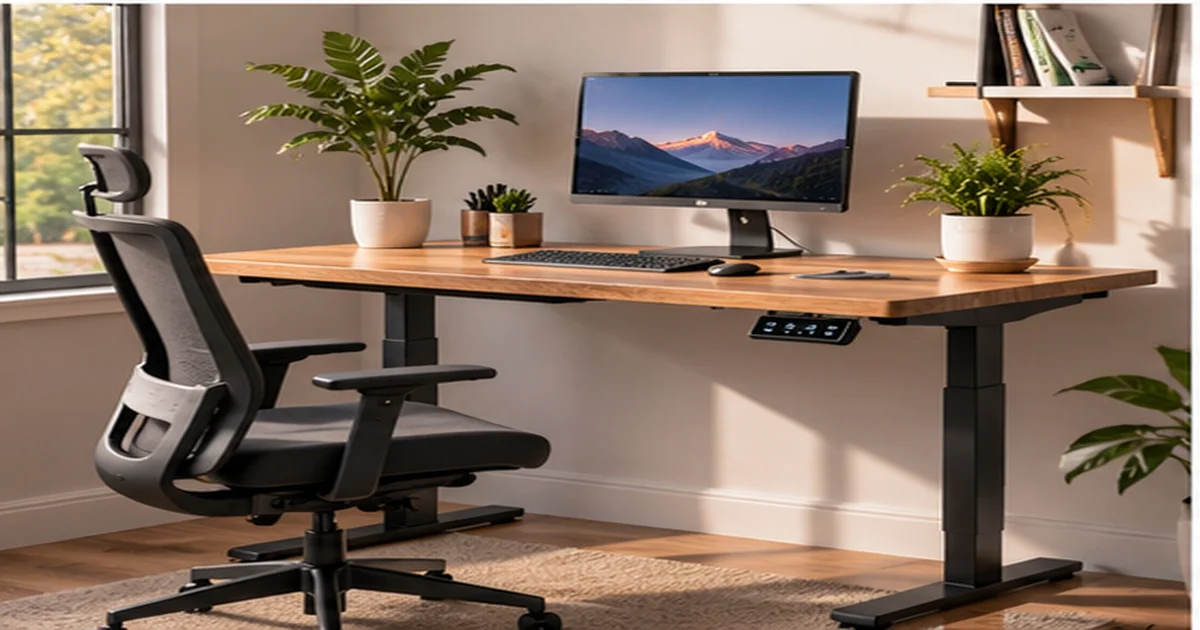
The FLEXISPOT EN1 One-Piece Standing Desk aims for a balance of accessible pricing and solid build quality. It is listed in several sizes, including 42", 48", 55" and 60" widths, and in finishes such as Maple, Walnut, Natural, Black and White, so it can suit both tight apartment alcoves and larger dual-monitor setups.
Seamless 1-inch whole-piece desktop
The EN1’s main selling point is its whole-piece, 1-inch thick desktop. Many entry-level desks use thinner spliced boards, which can flex under a heavy clamp-on monitor arm. A solid slab gives a clean, uninterrupted surface and a better base for clamp-on mounts, though the frame and mounting points still matter.
Quiet electric lift
The EN1 is listed with a lift range of 28.1 to 45.7 inches (29.1 to 46.7 inches including the 1-inch top) and operating noise under 50 decibels, which is roughly the level of a quiet conversation. That should let you raise or lower the desk mid-meeting without distracting others, but verify the specifications on the current listing.
Four programmable memory presets
The front-mounted keypad is listed with an LED height readout and four memory buttons. You could save your seated height, standing height, a walking-pad height and a fourth position for another household member. One tap moves the desk to the saved position.
Steel frame and 176-lb load capacity
The EN1 is listed with heavy-gauge steel legs and a 176-lb capacity, enough for two monitors, a docking station, speakers and desk accessories. Stability still depends on assembly and setup: level the feet and tighten the hardware according to the instructions. The steel legs are substantial, which contributes to the planted feel, but check independent reviews and demonstrations at the height you plan to use.
Choosing the right desk size for your space
Picking the right dimensions keeps your home office from feeling crowded while leaving room for comfortable arm posture:
42" or 48" width (bedrooms and small nooks): Ideal if your desk sits against a short wall or inside a studio apartment. It fits a laptop on a riser, an external keyboard and mouse, and a single 24- to 27-inch monitor.
55" × 28" (all-around depth): The 28-inch depth gives generous eye-to-screen distance for large monitors while leaving forearm support in front of your keyboard.
60" × 24" (wide multi-monitor setups): Five feet of horizontal workspace for dual monitors, a laptop dock, notebooks and a desk lamp without protruding far into a narrow room.
When to upgrade to an executive L-shaped desk
A rectangular desk like the EN1 fits most home offices, but power users who need built-in filing drawers, lockable storage and wrap-around surface area may prefer a dedicated executive workstation. Models such as the Navodesk Pro Executive Standing Desk are listed with a dual-motor L-shaped surface and an integrated side storage cabinet, which may suit larger dedicated office rooms.
Three simple tips for a healthier sit-stand routine
Buying a standing desk is step one; using it consistently is what makes the difference.
Start with a 45/15 pattern: Instead of forcing yourself to stand for hours on day one, try sitting for 45 minutes and standing for 15 minutes each hour, then adjust to what feels comfortable.
Add an anti-fatigue mat: Standing on bare hardwood or tile tires your calves quickly. A cushioned mat encourages small movements that keep you comfortable.
Position monitors at eye level: Whether sitting or standing, the top third of your screen should sit at eye level with your elbows bent at a relaxed angle.
Final verdict: is the FLEXISPOT EN1 worth buying?
If you want to reduce the time you spend sitting without paying for boutique office furniture, the FLEXISPOT EN1 One-Piece Standing Desk covers the essentials: a seamless 1-inch desktop, a quiet lift, four memory presets and a steel frame. Confirm the current price, specifications and reviews on the seller listing before you order.
Practical buying considerations
Measure the room before choosing a desktop
Start with the wall where the desk will sit, then account for the chair, door swing, drawers and the path people take through the room. A 60-inch desktop can look compact in an online photograph and feel enormous in a narrow bedroom. Use painter’s tape to mark the footprint on the floor. If the desk faces a wall, allow enough depth for your screen and keyboard without forcing your wrists against the front edge. This simple exercise prevents one of the most common online furniture regrets: buying the right desk in the wrong size.
The importance of a low enough desk
Standing height receives most of the attention, but the minimum height can matter more for daily comfort. If a desk cannot lower far enough, a shorter user may raise their shoulders while typing. A footrest or adjustable chair can sometimes help, but the best solution is a workstation that fits both seated and standing positions. Compare the published adjustment range with your own elbow height, not just your overall height. Remember that the thickness of the desktop affects the working surface height.
One-piece top versus split top
A continuous desktop offers a clean visual surface and avoids the seam found on some entry-level models. That can be pleasant for writing, mouse movement and keeping a large desk mat flat. However, one-piece does not automatically mean stronger in every configuration. The material, mounting points, frame and monitor-arm placement all affect rigidity. If you use a heavy clamp-on monitor arm, check the desktop and frame manufacturer’s guidance. A seamless top is a useful feature, but it should not replace a careful look at stability.
How to think about wobble
All elevated desks move somewhat when pushed, especially at their tallest settings. What matters is whether normal typing or moving a mouse makes the screen distracting. Wider desktops, uneven floors, heavy monitor arms and a poorly tightened frame can change the experience. Before judging a desk, level the feet and tighten hardware according to the instructions. If possible, look for independent stability demonstrations at the standing height you expect to use. Marketing claims like ‘rock solid’ are too vague to settle the question.
Memory presets are a habit tool
A programmable controller is not just a convenience feature. It removes the friction of remembering exact heights and holding a button every time you change position. Set one preset for seated work and another for standing work after adjusting the chair, keyboard and screen. A third setting might suit a different household member, but avoid assuming that one preset works for every person. The point is to make movement easy enough that you actually use the feature.
Cable management is part of ergonomics
An adjustable desk changes the distance between your desktop and wall outlet. A power cable that looks tidy while seated can become taut at standing height. Leave safe slack, route cables away from moving frame parts and use a cable tray if appropriate. Keep power strips off the floor where chair wheels or feet can catch them. Before the first full-height adjustment, watch the cables carefully. This is less glamorous than selecting a desktop finish, but it prevents expensive and frustrating accidents.
A balanced sit-stand routine
A standing desk is not a medical treatment and there is no universal perfect schedule. Alternating positions can help break up long periods of sitting, but standing motionless all day creates its own discomfort. Start with short standing intervals and adjust based on comfort. Take walking breaks, change posture, and keep the monitor positioned so you are not looking sharply up or down. If you have persistent pain, an ergonomic assessment or healthcare professional may be more helpful than buying additional desk accessories.
Questions readers often ask
Is the FLEXISPOT EN1 a good fit for a small room?
It can be, because it is listed in several widths, including 42 and 48 inches for bedrooms and small nooks. Measure the wall, chair space and door swing first, and mark the footprint with tape before ordering.
Does the desk go low enough for seated work?
The listed range is about 28.1 to 45.7 inches without the desktop, or 29.1 to 46.7 inches with its 1-inch top. Compare that range with your own elbow height, because a desk that cannot lower far enough can push your shoulders up while typing.
How stable will it feel at standing height?
Stability depends on the frame, the desktop, the floor and anything clamped to it, such as a heavy monitor arm. Level the feet, tighten the hardware as instructed and check the manufacturer’s load guidance; the listed capacity is 176 lbs.
Is a one-piece desktop always better than a split top?
A one-piece top gives a smoother surface and avoids the center seam found on some entry-level desks, but it does not guarantee rigidity by itself. Frame design, mounting points and load placement matter as well.
Final buying perspective
The strongest choice is the one that fits your routine, your available space, your budget and the maintenance you are comfortable doing. Compare the current listing against the practical considerations above, and avoid relying on promotional superlatives alone. If a specific feature is essential, verify it for the exact model and region before ordering.