Editorial disclosure: This is a research-based buying guide, not a hands-on product test or professional endorsement. Product features, prices and availability may change; confirm current details with Amazon or the manufacturer. As an Amazon Associate, we earn from qualifying purchases, and we may earn commissions from other qualifying links.
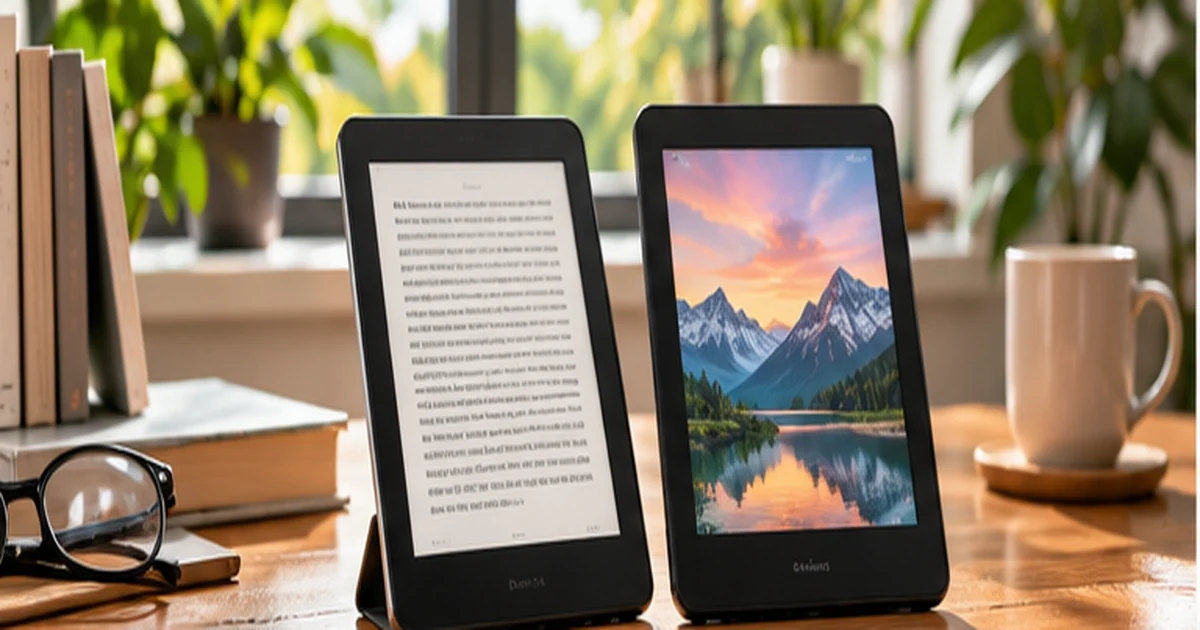
A novel is mostly black text on a light page. A cookbook, graphic novel or illustrated travel guide is a very different reading experience. That distinction is more useful than deciding which device is newer or more expensive. If your library consists of long-form fiction, the Paperwhite already does the central job extremely well. If pictures, color-coded notes and illustrated pages are part of your daily reading, Colorsoft offers something the monochrome model cannot reproduce.
At a glance
Choose Paperwhite when text clarity, battery life and price dominate. Choose Colorsoft when illustrated material and color notes are regular parts of your library. Neither device is automatically the right choice for every reader. The useful test is to look at your last ten books: if nine were ordinary novels, you have your answer. If several were comics, diagrams or richly illustrated titles, the additional cost becomes easier to justify.
Kindle Paperwhite vs. Colorsoft: key specifications
These figures come from the product listings as summarized in this article. They are manufacturer-style specifications, not independent test results, so confirm them for the exact model and region you plan to buy.
| Specification | Kindle Paperwhite | Kindle Colorsoft |
|---|---|---|
| Display size and type | 7-inch monochrome glare-free E-Ink | 7-inch high-contrast color E-Ink |
| Storage | 16GB (holds thousands of books) | 16GB |
| Battery life per charge | Up to 12 weeks via USB-C | Up to 8 weeks via USB-C |
| Front light and warmth | Adjustable white-to-amber warm light | Adjustable white-to-amber warm light, plus Page Color invert |
| Highlight colors | Grayscale shading only | 4 colors: yellow, orange, blue and pink |
| Water resistance | Listed as waterproof | Listed as waterproof |
| Distraction-free software | No apps or notifications | No apps or notifications |
A color screen is not a tablet screen
Color E-Ink is designed to look relatively paper-like. Its palette is more muted than a phone or tablet, and page changes behave differently from a conventional display. That is part of the trade-off. The Colorsoft makes covers and diagrams more meaningful without turning the Kindle into a bright entertainment screen. Readers expecting saturated, glossy colors or video-like motion may be disappointed. Readers who prefer the calmer feel of an e-reader may find the compromise sensible.
Why monochrome still has an advantage
The Paperwhite is optimized for reading text. With no color filter layer to account for, black letters can look particularly crisp against the background. The Colorsoft is still capable of displaying ordinary books, but its display design prioritizes a broader range of content. Compare the devices using the same paragraph in the same lighting if possible. Small differences in perceived contrast can matter over a long evening of reading, even if a spec table makes both devices look similar.
Battery estimates need context
The listings quote up to twelve weeks for Paperwhite and eight for Colorsoft. Those are manufacturer-style estimates under particular usage conditions, not a promise for every reader. Higher brightness, frequent downloads and long reading sessions shorten the interval. If you travel for weeks without convenient charging, Paperwhite has the stronger quoted endurance. If you charge your phone and other devices regularly, Colorsoft’s shorter rating may be a minor compromise.
Highlights can change a study workflow
For someone who marks passages in nonfiction, the ability to separate notes by color may be more valuable than seeing a book cover in color. A simple system could reserve one color for definitions, another for questions and a third for memorable examples. The system only helps if you use it consistently. Before paying extra, ask whether you actually review highlights later. If you rarely annotate, color highlighting is an attractive feature that may not change your reading habits.
Storage and book formats
Both models are listed with 16GB. That is ample for a large text-based library, but image-heavy comics and graphic novels take more space than plain ebooks. Check the exact configuration and supported file types in the listing you intend to buy. The Kindle ecosystem is convenient for Amazon purchases, yet library borrowing and sideloading options can vary by country and format. A good device should fit your existing book sources, not just your future purchases.
Travel, water and everyday handling
A seven-inch reader can be pleasant on a train or airplane because it is large enough for comfortable text without the bulk of a tablet. Waterproofing adds reassurance around pools and baths, but it is not an invitation to expose charging ports to water or ignore care instructions. A protective case may matter more than a small difference in weight if you frequently toss the device into a bag. Consider how you hold it for long periods, especially when reading one-handed.
Which one earns its price
The Paperwhite earns its price on text clarity, endurance and cost. The Colorsoft earns a premium only if you will use its color for illustrated books, comics or color-coded highlights. If you are unsure, start from your reading history rather than the spec sheet.
Before you order
Check the exact model, size or plan offered in your country. Read current instructions and eligibility terms, compare total costs rather than the headline price, and make sure the feature that attracted you is actually included in the listing. These steps are especially important when a product has several generations or regional variants.
Frequently asked questions
Is the Kindle Colorsoft worth the extra money?
It is worth it if illustrated books, comics, diagrams or color-coded highlights are a regular part of your reading. For mostly text-based novels, the Paperwhite already covers the main job.
Which Kindle has the longer battery life?
The Paperwhite is listed at up to 12 weeks and the Colorsoft at up to 8 weeks. Real battery life depends on brightness, downloads and how long you read.
Can I highlight in different colors?
On the Colorsoft, yes: it is listed with four highlight colors (yellow, orange, blue and pink). The Paperwhite offers grayscale shading only.
Are the Paperwhite and Colorsoft waterproof?
Both are listed as waterproof, but follow the manufacturer’s care instructions and avoid exposing the charging port to water.
Final verdict
Look at your last ten books. If most were ordinary novels, buy the Paperwhite. If several were illustrated or you annotate in color, the Colorsoft’s extra cost is easier to justify. Confirm the current price and specifications on the seller listing before you order.